

5 Polite Resignation Email Templates to Quit on Good Terms
Geared up to quit your job with style? Well, dive into the polite resignation email templates and make your exit the one to remember. 🫡

Imagine finally placing an order for a product you've been eagerly waiting to buy. You would want all the updates as the order passes through each phase. This is where shipping confirmation emails come in to appease your curiosity.
A shipping confirmation email is one of the most awaited updates for any customer. It informs them that their order has been dispatched with all the other vital details included in the email.
With most businesses now focusing on post-purchase customer experience, it's only fair that we discuss shipping confirmation email examples in detail.
But before we explore all the awesome examples, let's introduce you to shipping confirmation emails.
Shipping confirmation emails are categorized as transactional emails. Sending them to customers informs them that their order has moved into shipping and assigns them a tracking number.
Shipping confirmation emails contain all the details relevant to shipping and the product being shipped. These emails help your customers keep track of their orders and give them an expected delivery date. With this information, they are actively included in this product purchase journey.
People often confuse shipping confirmation emails (which are also referred to as shipping notification emails) for order confirmation and delivery completion emails, but they are different.
While all three emails are precious to customers, each serves a different purpose.
An order confirmation email is sent to your customer immediately after they place an order. This is to ensure your customer that you have accepted their order. It also works as proof of an order being placed and a receipt to refer to for later concerns.
An order confirmation email is followed by a shipping confirmation email to inform your customer that their order has been dispatched.
And then, finally, a delivery completion email is sent.
A delivery completion email informs your customer that the delivery process has been completed from your end. Your customer should have received the item at this point. If they haven't yet received it, they would know to contact the customer support team.
Shipping confirmation email examples below will give you a better idea of structuring shipping email templates.
Shipping confirmation emails are being sent out by almost all businesses that process their orders online. Hence, we are not short on examples. However, we have shortlisted the five inspirational examples for you to seek ideas. Have a look:
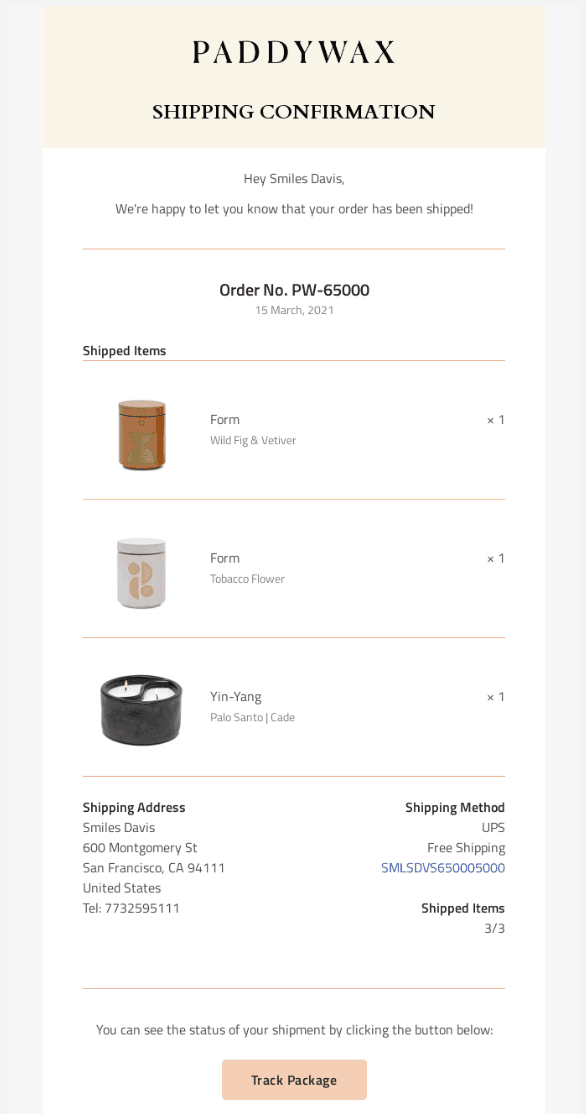
This email from Paddywax is an excellent illustration of how a shipping confirmation email should be. Starting with all the necessary order details, followed by shipping information, and finally, the CTA button to track the package.
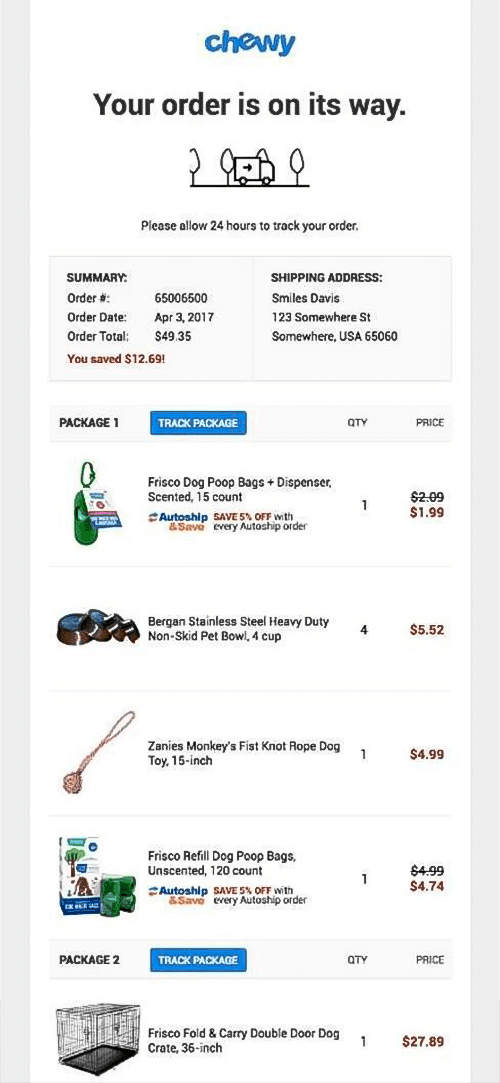
Chewy’s take at shipping confirmation email is apt too. See how they start off with the order summary and shipping information which is followed by all the other relevant information. What’s different here is that they included the specifics for two different packages sharing the individual details and tracking buttons for each.
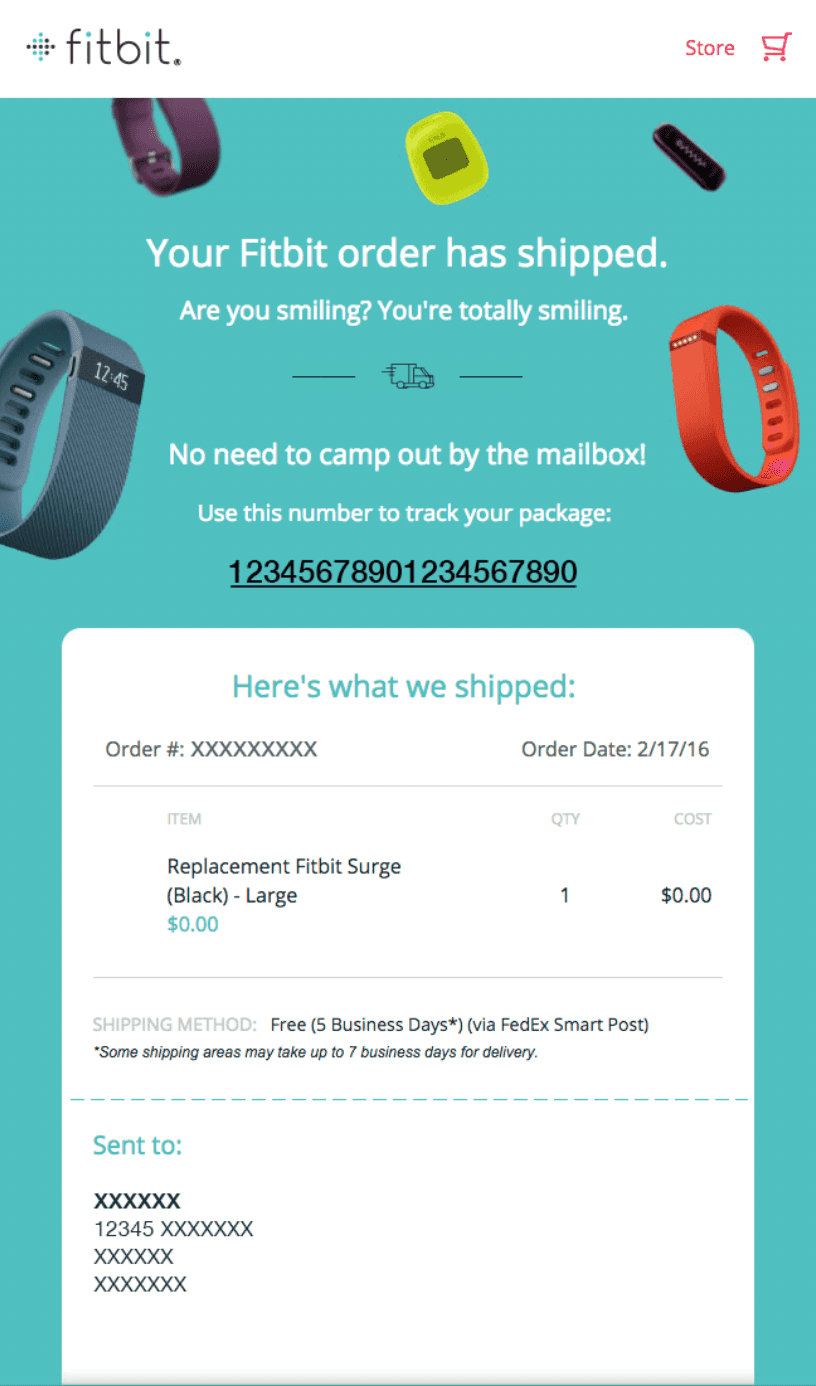
Fitbit gets everything right in their shipping confirmation email just like the shipping email samples above. However, instead of going with a button for tracking the package, they share the tracking number which their user can click to open the link to tracking.
We wouldn’t recommend following this practice because it takes up more space, and not evident about the purpose it fulfills. Without reading the text above the number, users can be unsure about what the number is for.
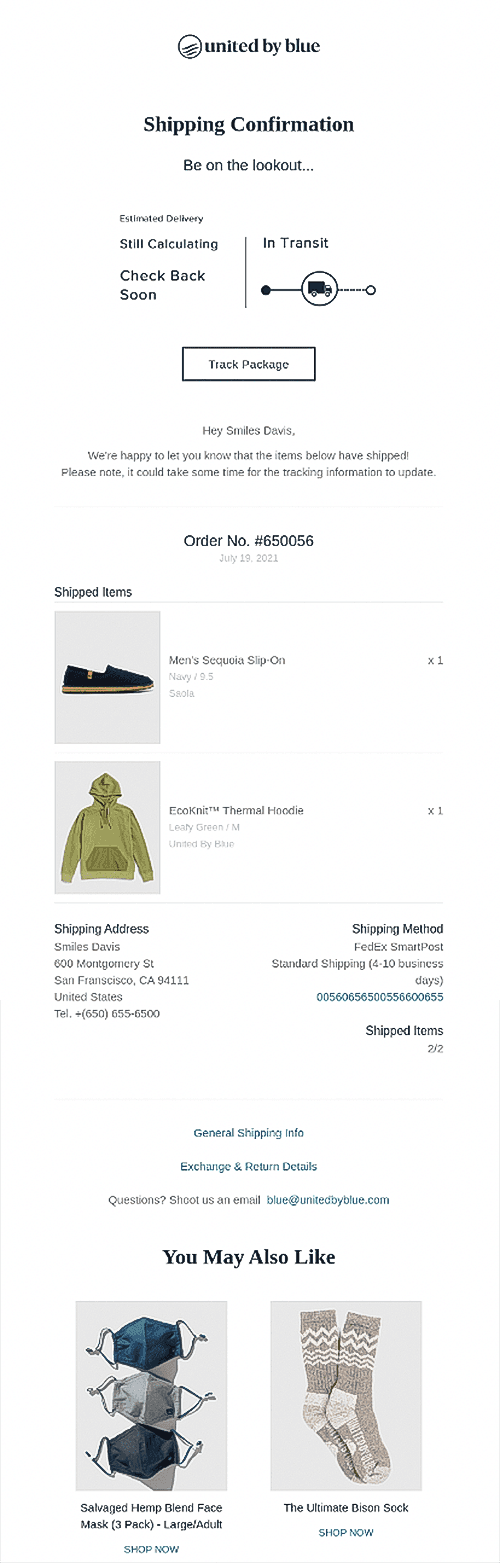
United By Blue is home to apparel for men and women. Their shipping confirmation email example covers it all. It starts with a live tracking update and the estimated time of delivery that is visible right on the email. This is followed by all the necessary details that a customer expects to see.
The email ends with a perfect example of cross-selling, as you can see images of products that complement their customer’s purchases shown at the end.
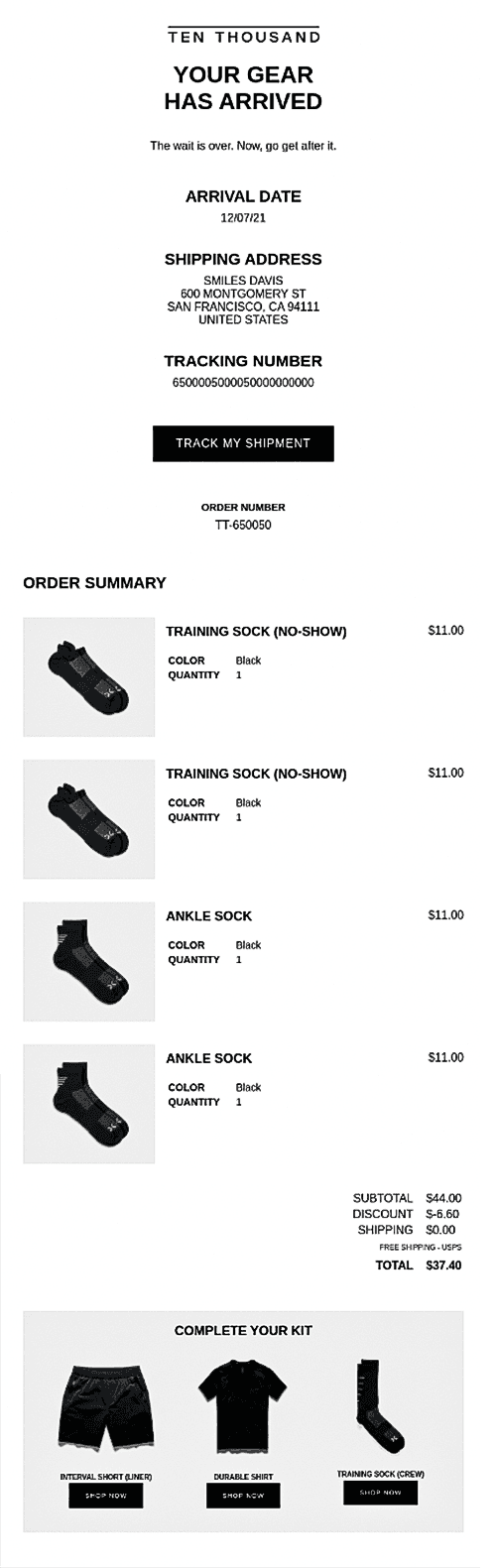
TEN THOUSAND is an online athleisure wear store. Their example of a shipping confirmation email is as complete as it gets. From tracking updates to order and shipment details and, finally, a cross-sell section that helps the buyer complete their kit.
These examples should give you a clear understanding of what your shipping confirmation email should look like. To make this even easier, have a look at some of the practices you can follow.
You are probably wondering how to make your shipping confirmation emails as precise as the examples above. To help you out, we have compiled a list of best practices to make your shipping confirmation emails better.
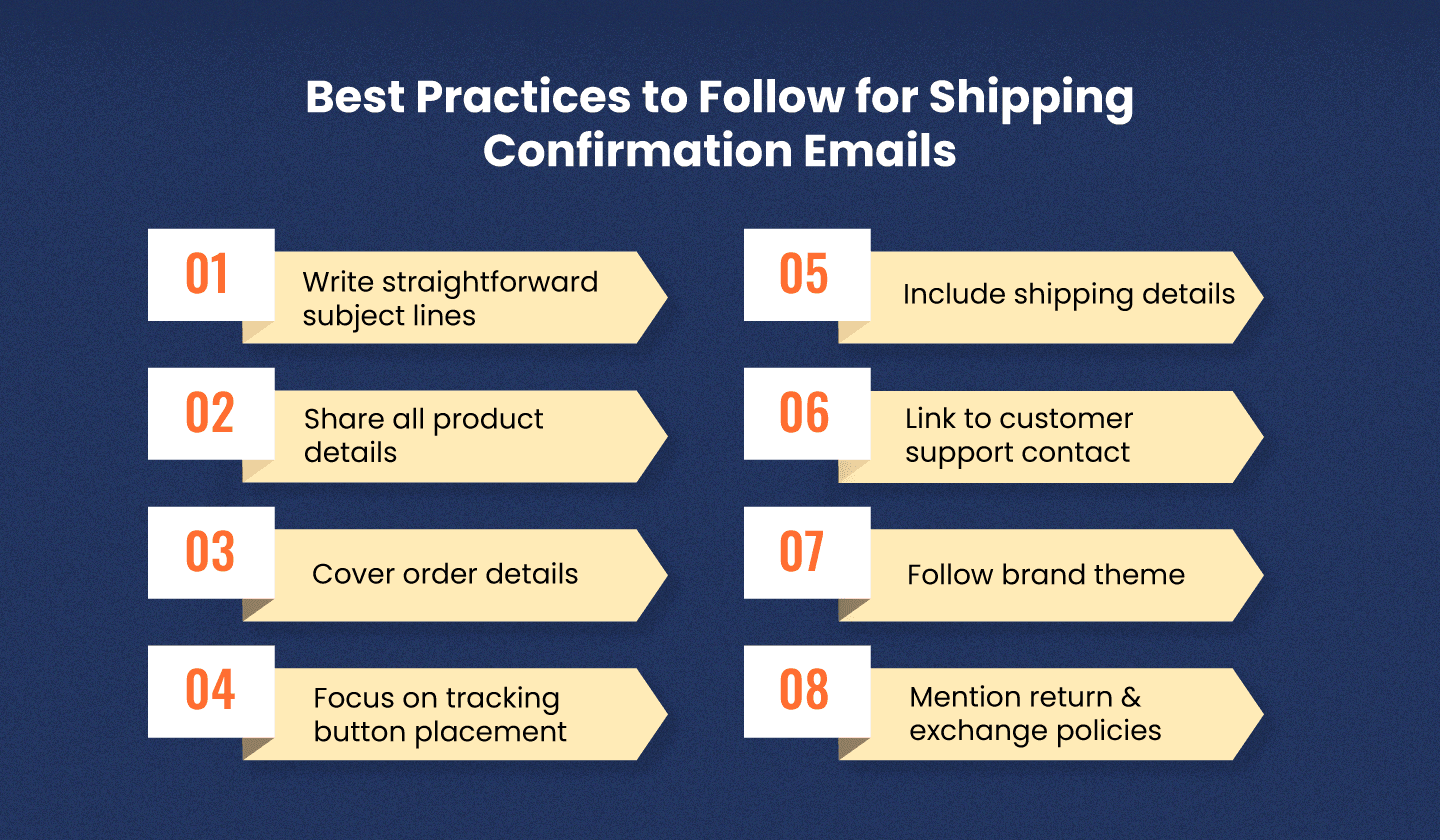
Our foremost tip for you is to keep your email subject lines to the point. This is not a promotional email seeking your creativity, so start with something like_"Your order has been shipped" OR "Here's the tracking information for your recent order."_
Product details that include your product's name, image, and price are vital to include in your shipping confirmation email. It is a great reminder for your customer about what they ordered.
It is essential to back your shipping confirmation email with details about the order, including the order number and date the order was placed.
When a customer opens a shipping confirmation email, the action they are most likely to take next is to view tracking information. Therefore, the tracking information link or Call To Action (CTA) button placement must be spot-on.
You should keep the button central and visible without having to scroll down the screen.
What would be a shipping email without all the vital shipping details? Pointless.
Make sure to add the tracking number, shipping service provider name, expected delivery date, shipping address, and billing address.
It would be useful to provide your customers with a moving cost estimator, to assist them should they plan on relocating before receiving their shipment.
At the end of a shipping confirmation email, you can expect customers to have questions. Therefore, in the email, you must provide a link to contact your customer support team.
Email branding is vital to bring authenticity to your emails. Your shipping confirmation emails can follow the same brand theme as any of your other emails. By doing so, you'll increase brand recognition through emails.
Another great add-on in your shipping notification emails is your return and exchange policies. This may not be a necessity, but it can be useful for those who might have missed those details on your website and previous emails.
Unlayer's drag-and-drop email editor can help you design shipping confirmation emails that fulfill your goals. The tool is super easy to use and comprises various features that make email designing a walk in the park.
Unlayer enables you to create responsive designs, so whether your users view your emails on smartphones or desktops, you've got nothing to worry about. Couple this with custom design blocks for branding and merge tags for personalization, and you've got a complete package to design captivating emails.
You can then choose from various email service providers, including Campaign Monitor, Mailchimp, Gmail, etc., to export your designs.
The purpose of shipping confirmation emails is to enhance your customer’s experience by providing them with shipping updates. With the help of the shipping confirmation email examples above, you can now smoothen your shipping process and design shipping confirmation emails that your customers need.
Insights on email design, content creation, and developer productivity.
Geared up to quit your job with style? Well, dive into the polite resignation email templates and make your exit the one to remember. 🫡

Eager to tease and please? Grab a cup of tea, craft a crispy teaser email, and leave your audience wanting more. Let’s build some hype together! 🤫

Did you miss the interview? No biggie! Learn how to craft a professional apology for not attending an interview and keep the door open for your dream job. ✌🏻