
AI Document Builder for Your App
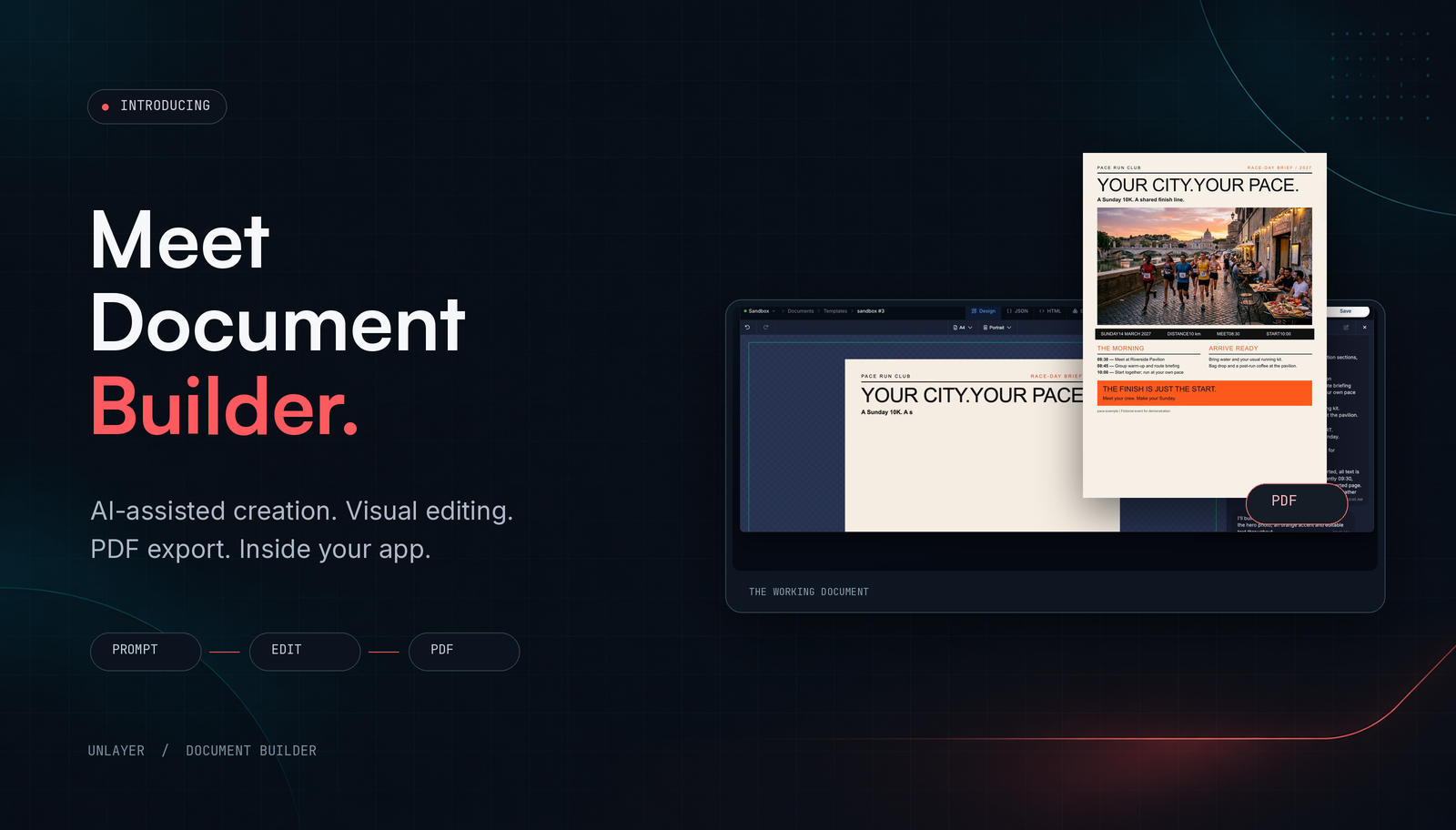
Unlayer Document Builder combines a drag-and-drop editor with AI Assistant. Users can describe a document, refine it through conversation or visual controls, and export a PDF when their plan includes PDF export. Your application provides the surrounding account, storage, and business workflow.
This guide introduces that experience through a real product demonstration: a one-page race-day brief for the fictional PACE Run Club. It also explains what developers need to connect before offering document creation to their own users.
What can an AI document builder do?
Create an editable starting point: use a brief to generate a document design, not only paragraphs to copy elsewhere.
Apply follow-up edits: ask AI Assistant to change information directly on the working canvas.
Support manual refinement: use visual tools for headings, text, images, columns, dividers, and page breaks.
Produce a reviewed deliverable: inspect the layout and export a PDF with the appropriate plan access.
What does an AI-generated document look like?
Our PACE demonstration creates a race-day brief with event details, a running photograph, a morning schedule, and arrival instructions. A follow-up request sets the start time to 10:00. The final document carries that time in both the event-details strip and the schedule.
The result below is the actual one-page document from the demonstration. PACE and its event are fictional; this is an example of the editing workflow, not a customer case study.
For a similar test, start with a complete brief. This adapted prompt uses the final demonstration details; it is not a transcript of the original request:
Create a one-page race-day brief for the fictional PACE Run Club.
Headline: Your city. Your pace.
Supporting line: A Sunday 10K. A shared finish line.
Date: 14 March 2027. Distance: 10 km.
Meet: 08:30 at Riverside Pavilion. Start: 10:00.
Schedule: 08:30 meet; 08:45 warm-up and route briefing;
10:00 start together and run at your own pace.
Arrival notes: Bring water and your usual running kit.
Bag drop and a post-run coffee are available at the pavilion.
Use a clear hierarchy and a running photograph.
Keep all content on exactly one printed A4 page, with readable
text and space around the sections. Do not invent event details.
Include: Fictional event for demonstration.
How does an AI document builder work?
1. Start with the facts and the intended output
Specify the document type, audience, required information, and page target. Separate facts from styling instructions. A proposal needs an approved scope and fee; a menu needs confirmed dishes and prices; a CV needs the candidate's actual history.
For PACE, the factual input is the event information. The design instruction is to organize it as a readable one-page brief. That distinction gives you a useful review standard: the design can change, but the supplied facts should not drift.
2. Generate the design on the canvas
Unlayer's AI Assistant receives the prompt and relevant design context. It streams back design operations that the editor applies as they arrive. The result stays in the builder, where the user can inspect it and continue editing.
The difference from a text-only step is practical. A heading, image, and schedule become parts of a document rather than separate suggestions someone must assemble afterward. Generation is a starting point, not confirmation that every fact or layout choice is correct.
3. Refine a specific detail
In our PACE example, the user asks: “Perfect, change the start time to 10:00.” The final output shows the updated start time. For your own documents, name the field and replacement value explicitly, then check every place that information appears.
Users can follow up, stop generation, or undo a result. They can also switch to visual controls when a direct layout adjustment is easier than describing it. Our AI Assistant overview explains the broader conversational editing approach.
4. Review the page and export the PDF
Document Builder includes page breaks and page-aware editing. Advanced page-format controls and the multi-page minimap have their own plan requirements. A one-page target still needs checking against the real content; a longer description can change the fit.
PDF export uses Unlayer's cloud service and counts toward the workspace's export allowance. Changing paper geometry or substituting different merge-tag values can trigger server-side pagination. Inspect the actual exported file, especially after those changes.
When do you need an editor rather than only document generation?
Choose the workflow around what users must control. If the application defines every layout and people only need the resulting file, a code-first generation workflow may be sufficient. If users need to arrange content, refine a design, or create documents of their own, an editing surface addresses a different job.
For example, our Node.js certificate PDF tutorial uses application-authored React and a separate PDF-printing step. It does not embed a visual editor. Document Builder is for the customer-editable part of the experience; it is not a claim that visual changes reconstruct that React source.
Possible uses include proposals inside a sales product, menus inside hospitality software, or CVs inside a career platform. These are integration ideas, not automatic connections to an existing CRM, point-of-sale system, or candidate database.
How do you embed an AI document editor in your app?
The Document Builder quickstart documents the editor setup. Install the SDK, provide an editor container, and initialize it with displayMode: 'document'. AI Assistant additionally requires an identified end user and paid-plan access.
This minimal example combines the documented document-mode initialization with the documented AI Assistant configuration:
<script src="<https://editor.unlayer.com/embed.js>"></script>
<div id="editor-container" style="height: 700px;"></div>
<script>
  unlayer.init({
    id: 'editor-container',
    displayMode: 'document',
    projectId: 1234, // Replace with your numeric Project ID
    user: { id: 'user-123' }, // Your current end user's ID
    features: {
      ai: { enabled: true, assistant: true }
    }
  });
</script>
The quickstart recommends an editor area at least 1024 pixels wide and 700 pixels high. Treat this as an initial editor configuration, not a complete production integration. Check the documentation for your project's builder version and available features.
Your application still needs to connect:
Saving and reopening: persist the editable design JSON and reload it when the user returns. Follow the
Authorization: decide which user and account can access each design.
Export handling: provide the reviewed download or next step, and handle unavailable exports or exhausted allowances.
AI availability: configure the Assistant, review credit access, and decide where it belongs in your product.
What should you test before rolling out document creation?
Start with one representative document and a realistic edit, not a gallery of first drafts. The PACE test is useful because the start time appears in more than one place. It tests whether the final document is internally consistent, not just visually attractive.
Use these checks for your own pilot:
Fact preservation: compare names, dates, prices, totals, and other supplied values with the source.
Edit accuracy: verify the requested replacement and inspect related content for unintended changes.
Page fit: inspect the final page count, smallest text, last section, and footer.
Persistence: reopen the saved design and confirm it remains editable.
Output and access: test PDF access and the export allowance in the workspace you will use.
Then evaluate a different content shape. The goal is a reliable creation-and-review path for your users, not a promise that every document will look identical.
Frequently asked questions
What is the difference between an AI document generator and an AI document editor?
For this workflow, generation creates the starting design and editing lets the user change it afterward. Unlayer combines AI-assisted creation with conversational and visual editing, followed by PDF export where included in the plan.
Can users edit a document after AI generates it?
Yes. The result stays editable in Document Builder. Users can submit follow-up requests, undo a result, or use the visual tools.
Does every plan include AI and PDF export?
No. AI Assistant is a paid feature, and PDF export requires the relevant access. Advanced page capabilities have separate requirements. Check current pricing and the documentation for your project.
Is this a standalone PDF editor for existing files?
Document Builder is an embedded document-creation and editing experience, rather than a standalone editor for existing PDF files. Users work with an editable design in your app, then export it as a PDF.
Bring document creation into your product
Start with one document your users need to create and revise. Explore the editor, test a focused change, and review the exported PDF before planning the wider rollout.